 SpeedyPad
Edit text – in a flash.
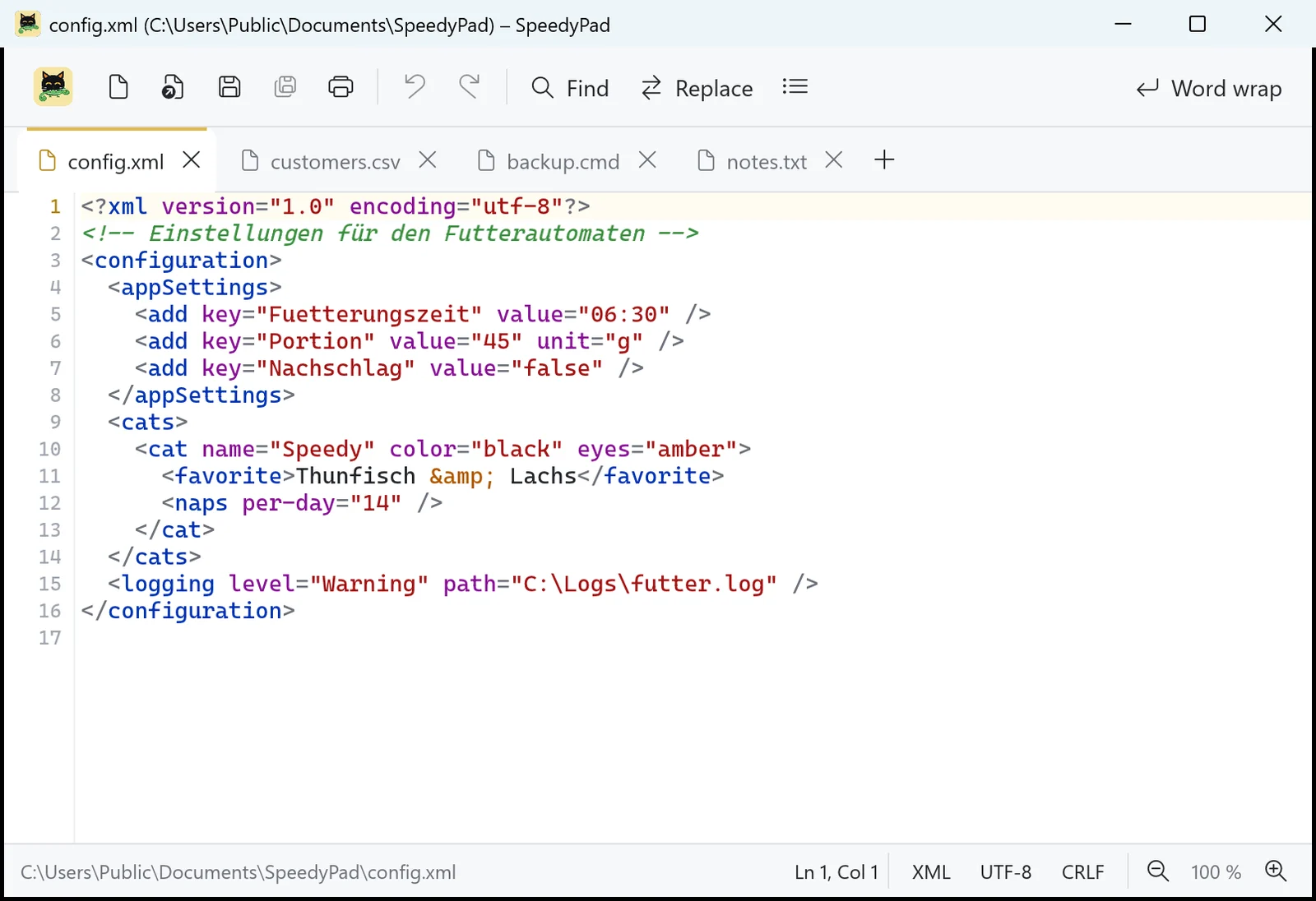
Notes, log files, CSV lists, XML configs, batch scripts: SpeedyPad opens them instantly, each in its own tab. And the tabs stay – even unsaved ones are back the next time you start it. Named after a cat who never closes anything either.
- No internet access
- No ads
- English & German
Features
Tabs that stay
Every file in its own tab. SpeedyPad doesn't nag when you close it – everything, even unsaved text, is back exactly as it was next time. Drag tabs to reorder them, Ctrl+Shift+T brings a closed one back.
Colourful and clear
Highlighting for XML/HTML, batch (.bat, .cmd), CSV (one colour per column), JSON, INI and .reg, log files (errors red, warnings orange), PowerShell, Python, SQL, YAML, Markdown and C-like languages.
Find & replace
With match count, match case, whole words and regular expressions (including $1 groups). Plus: go to line, duplicate line, line numbers, word wrap, zoom.
Any encoding
UTF-8 (with or without BOM), UTF-16 and ANSI are detected and kept when saving – as are Windows, Unix or Mac line endings. Switching is one click in the status bar.
Edit with SpeedyPad
Right-click any file in Explorer → "Edit with SpeedyPad". Optionally the default app for .txt, .log, .csv, .xml, .json, .ini and .md. Batch files still run on double-click as usual.
Previews in Explorer
With large icons, Explorer shows the beginning of every text file – with colour highlighting. Find the right file without opening it.

Speedy never writes anything down. SpeedyPad remembers everything.
Yes, it's the same Speedy as in SpeedyPDF, SpeedyCapture and SpeedyVisual. This time he has a chameleon in his mouth. The chameleon changed colour to blend in. It didn't work.
Windows
AvailableSpeedyPad is small, starts instantly and needs no account and no internet. One window for all files: open another file and it joins as a new tab.
Download the installer
SpeedyPad-Setup-1.0.1.exe- Version1.0.1
- SystemWindows 10 / 11, 64-bit
- Size5.0 MB
- LanguagesEnglish, German
Checksum (SHA-256)
Use it to check that the download is unchanged (PowerShell: Get-FileHash).
96b853a133f29701a2f6d8b807a5b3dd881e98ebf596c12740127642c1d29d52Keyboard shortcuts
- Ctrl + N / O / SNew / Open / Save
- Ctrl + WClose tab
- Ctrl + TabNext tab
- Ctrl + Shift + TReopen closed tab
- Ctrl + F / HFind / Replace
- F3Find next
- Ctrl + GGo to line
- Ctrl + DDuplicate line
- Alt + ZWord wrap
Installation
- Download and run the installer.
- If Windows SmartScreen warns you: "More info" → "Run anyway".
- At the end, optionally "Make SpeedyPad the default editor": Windows opens Settings, where you pick SpeedyPad for the file types you want.
- On Windows 11, "Edit with SpeedyPad" is in the context menu under "Show more options" (or Shift+right-click).

Also named after Speedy
SpeedyPDF
The fast, lean PDF editor: highlight, annotate, sort pages and merge PDFs. For Windows and Android.

Also named after Speedy
SpeedyCapture
Screenshots with an editor: Print key, drag an area, draw arrows and text, blur anything confidential. For Windows.

Also named after Speedy
SpeedyVisual
Flowcharts, org charts, timelines and mind maps in seconds – with templates and Excel import. For Windows.
Your text stays with you
SpeedyPad has no internet access, collects no data and needs no account. Unsaved tabs are only cached locally in your user profile. The only one reading along is Speedy – and he can't read.